Read the visible rate
Detect one unambiguous exchange-rate line on the order currently open in Admin.
Chrome extension · Live
Switch visible Shopify Admin order amounts between the customer’s checkout currency and your store’s native currency—without leaving the order page.
Independent extension by Massdex. Not affiliated with or endorsed by Shopify.
Wholly synthetic demo values · not customer data
How it works
The extension works with the information Shopify already shows to authenticated staff on the order page.
Detect one unambiguous exchange-rate line on the order currently open in Admin.
Make store-native amounts primary while checkout values remain available as context.
Switch back at any time and restore Shopify’s original checkout-currency text.
LocalPrivacy boundary
Conversion happens locally in Chrome. No order, customer, credential or browsing data is sent to Massdex or another third party. The public extension has no Massdex account, API token, pairing step, Worker call or analytics.
Published proof
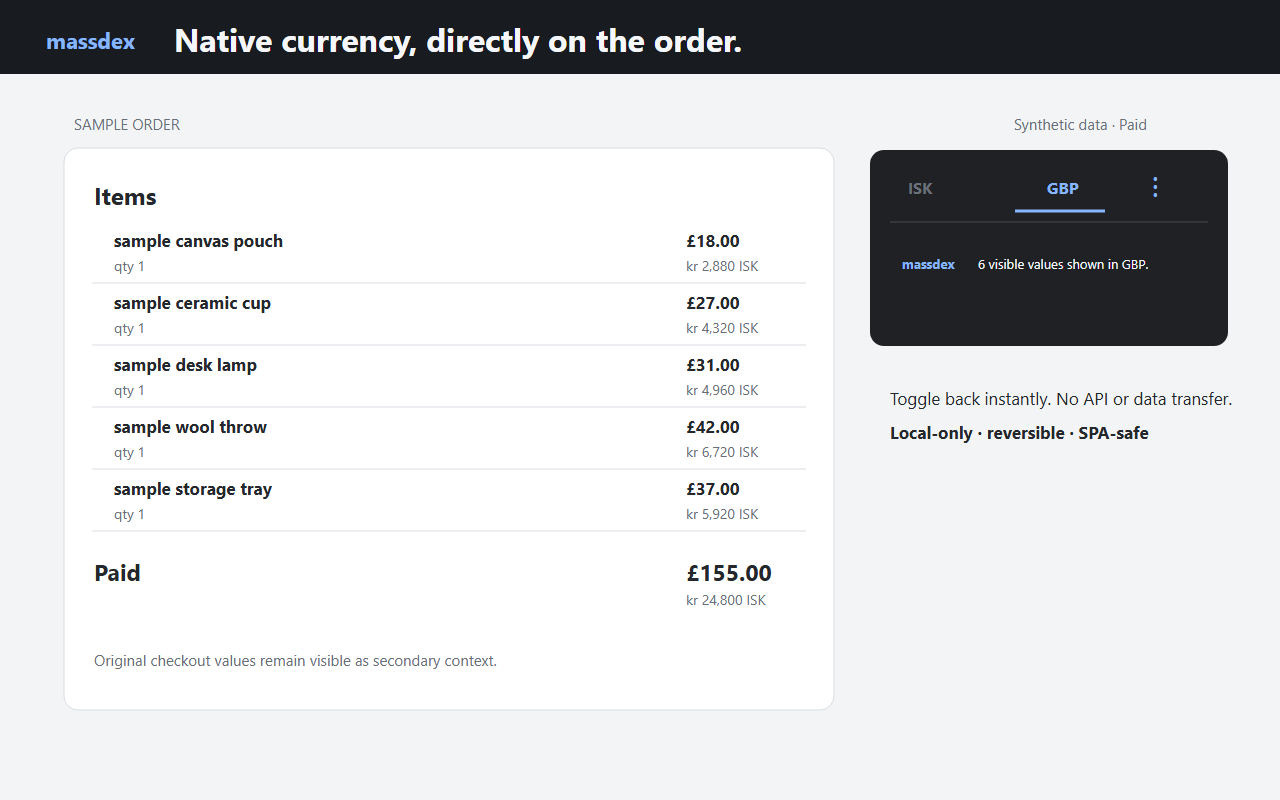
This is the owner-approved Chrome Web Store screenshot. Every amount and item is synthetic; the screenshot is presented as product evidence, not a customer order.
Fail-closed fit
If Shopify does not expose exactly one valid visible conversion rate, the extension leaves the DOM unchanged and explains that values are unavailable.
Explicit limits
Official distribution
The button opens the published Chrome Web Store listing. Chrome—not this website—shows the permissions, version and installation confirmation.